We research products independently. When you buy through links on this page, we may earn a commission from Amazon at no extra cost to you. As an Amazon Associate we earn from qualifying purchases. Read our affiliate disclosure.
A 1080p projector is still the smart buy for a lot of rooms. At normal seating distances on a 100 to 120-inch screen, Full HD looks sharp, and for the money you get more brightness, which often matters more than extra pixels. A bright 1080p image beats a dim 4K one every time.
What matters when you choose is brightness, the throw distance you have to work with, and the light source: a lamp is cheaper up front, while a laser needs no replacement. Below are six current 1080p projectors, from budget lamp models to laser units that can handle lights-on viewing.
Our top picks at a glance


Quick picks
- Best Overall: Epson Home Cinema 980Best for bright, color-accurate movies and sports.
- Best for Short Rooms: Epson Home Cinema 1100Best when the projector can't sit far back.
- Best Built-In Streaming: BenQ TH575iBest for Google TV without a separate stick.
- Best for Bright Rooms on a Lamp: Optoma HD30LVBest for high lumens at a lower price tier.
- Best Laser: ViewSonic LS740HDBest for lamp-free brightness.
- Best Wireless Laser: Epson Pro EX11000Best for screen mirroring and conference-style use.
Comparison table
| Projector | Best for | Brightness (maker's rating) | Light source | Rated life (normal / eco) | Throw ratio | Amazon |
|---|---|---|---|---|---|---|
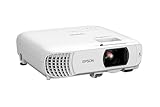
| Epson Home Cinema 980 | Overall | 4,000 lumens color/white | Lamp, 3LCD | 6,000 / 12,000 hours | 1.21–1.45 | Check price |
| Epson Home Cinema 1100 | Short rooms | 3,400 lumens color/white | Lamp, 3LCD | 6,000 / 12,000 hours | 1.0–1.21 | Check price |
| BenQ TH575i | Built-in streaming | 3,800 ANSI lumens | Lamp, DLP | 6,000 / 10,000 hours | 1.49–1.64 | Check price |
| Optoma HD30LV | Bright lamp | 4,500 ANSI lumens | Lamp, DLP | 4,000 / 15,000 hours | 1.5–1.66 | Check price |
| ViewSonic LS740HD | Laser | 5,000 ANSI lumens | Laser, DLP | 20,000 / 30,000 hours | 1.13–1.47 | Check price |
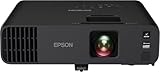
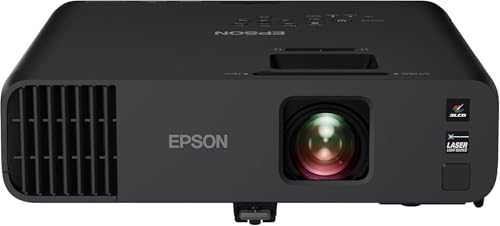
| Epson Pro EX11000 | Wireless laser | 4,600 lumens color/white | Laser, 3LCD | 20,000 hours | 1.32–2.12 | Check price |


Makers use different brightness standards, so read these figures as tiers. All six are native 1920 x 1080 projectors.
The best 1080p projectors, reviewed
1. Epson Home Cinema 980: Best Overall
Who it's for: families who want a bright living room projector for movies, games and sports.
The Home Cinema 980 is a 3-chip 3LCD projector rated at 4,000 lumens of both color and white brightness per Epson's listing and B&H. ProjectorCentral's spec table shows the same 4,000-lumen figure, although a line in that page's highlights still says 3,300, so we treat the table as the current figure. Equal color and white brightness is the strength of 3LCD: colors don't fall behind the white output.
A 1.2x zoom gives a 1.21 to 1.45:1 throw, so a 100-inch screen sits about 8.8 to 10.5 ft away. The lamp is rated at 6,000 hours in normal mode and 12,000 in Eco, and there's no lens shift, so plan your mounting height carefully. Epson's listing mentions auto picture skew and a built-in speaker for simple setups.
Pros
- 4,000 lumens color and white
- No rainbow effect with 3LCD
- Long Eco-mode lamp life
Cons
- Lamp will eventually need replacing
- No lens shift
- Listing is short on gaming specs
2. Epson Home Cinema 1100: Best for Short Rooms
Who it's for: apartments and small dens where the projector has to sit closer than usual.
Most 1080p projectors want 10 ft or more for a 100-inch picture. The Home Cinema 1100's 1.0 to 1.21:1 throw needs about 7.3 to 8.8 ft, thanks to a 1.21x zoom. That makes it an easy fit on a coffee table or shelf in a room where a longer-throw model wouldn't reach the wall.
It's a 3-chip 3LCD model rated at 3,400 lumens of color and white brightness, with lamp life of 6,000 or 12,000 hours in Eco mode. ProjectorCentral lists Miracast and HDMI CEC, and Epson advertises wireless streaming with AirPlay and Miracast. If you need even shorter throw than this, look at a dedicated short throw projector.
Pros
- Short 1.0–1.21 throw for tight rooms
- 3LCD color brightness
- Wireless screen mirroring
Cons
- Slightly dimmer than the 980
- Lamp-based
- No lens shift listed
3. BenQ TH575i: Best Built-In Streaming
Who it's for: people who want an all-in-one that works out of the box.
The TH575i pairs a bright 1080p DLP engine, rated at 3,800 ANSI lumens, with a licensed Google TV dongle, so Netflix and the other main apps are ready without shopping for a stick. ProjectorCentral lists it as a current model with 16.7 ms input lag at 1080p and 60Hz, which is fine for casual console gaming, and Full HD 3D support. If 3D matters to you, see our 3D projector roundup.
Its 1.49 to 1.64:1 throw needs about 10.8 to 11.9 ft for a 100-inch screen, so this is a long-throw projector that wants a back shelf or ceiling mount. Lamp life is rated at 6,000 hours, or 10,000 in Eco mode.
Pros
- Google TV included
- 3,800 ANSI lumens
- Low-lag mode at 1080p
Cons
- Long throw, not for small rooms
- Lamp-based
- DLP color wheel can show rainbow artifacts
4. Optoma HD30LV: Best for Bright Rooms on a Lamp
Who it's for: rooms with some ambient light on a tighter budget.
The HD30LV is rated at 4,500 ANSI lumens, the highest of the lamp projectors here. That's the number you want for sports with the blinds half open, as long as you accept the trade-offs of a lamp: rated life is 4,000 hours in normal mode and 15,000 in Eco.
Throw is 1.5 to 1.66:1 with a 1.1x zoom, or about 10.9 to 12 ft for 100 inches, so this one needs room behind the seating. ProjectorCentral lists Full HD 3D support. Optoma calls out a 4.2 ms response time in its Enhanced Gaming mode, but that's not the same thing as input lag, so gamers should look for a measured figure.
Pros
- 4,500 ANSI lumens
- Long Eco-mode lamp life
- 3D support listed
Cons
- Long throw
- Short normal-mode lamp life
- Input lag not published

5. ViewSonic LS740HD: Best Laser
Who it's for: anyone who wants 1080p and never wants to replace a lamp.
The LS740HD is the brightest projector in this group, rated at 5,000 ANSI lumens, with ProjectorCentral measuring 4,783 lumens in Bright mode. Its laser is rated for 20,000 hours, or 30,000 in SuperEco. That's a long time without maintenance, which is why this projector shows up in classrooms and golf simulators as well as living rooms. Building a simulator bay? Our sister site Golf Launch Monitor covers golf impact screens and enclosures.
A 1.3x zoom covers a 1.13 to 1.47:1 throw, or about 8.2 to 10.7 ft for 100 inches. It's more business tool than home-theater projector, so the sound and picture presets are less polished. For a stream-ready home unit, the TH575i is friendlier. We compare more laser options in our laser projector guide.
Pros
- 5,000 ANSI lumens
- Laser, no lamp changes
- Flexible zoom range
Cons
- Designed for installation first
- No smart platform
- DLP rainbow artifacts for sensitive viewers

6. Epson Pro EX11000: Best Wireless Laser
Who it's for: home offices and shared spaces where people need to cast a laptop or phone.
The Pro EX11000 is a 3-chip 3LCD laser projector rated at 4,600 lumens of color and white brightness with a 20,000-hour light source. Built-in Miracast handles wireless screen sharing, and the listing mentions dual HDMI ports and a 16W speaker.
A 1.6x zoom gives the widest throw range in this group, 1.32 to 2.12:1, or about 9.6 to 15.4 ft for 100 inches, so it works from a rear shelf or ceiling mount in larger rooms. It's a business-style unit, so home-theater extras like advanced HDR handling aren't the point.
Pros
- 4,600 lumens color and white
- 20,000-hour laser
- Wide zoom range
- Wireless screen sharing
Cons
- Business-oriented feature set
- Not a choice for very short throw
- Premium price tier for 1080p
How to choose a 1080p projector
Is 1080p enough?
For most people on a 100 to 120-inch screen, yes. Sharpness depends on how close you sit relative to the screen width. At around one and a half times the screen width or further, 1080p pixels are hard to see. If you sit closer, or you're building a 150-inch screen, 4K starts to earn its price.
Our screen size calculator shows where your seating lands. If your numbers point to 4K, compare the options in our best laser projector guide.
Brightness and room light
Dark rooms need less than you'd think. A 100-inch screen has about 29.7 sq ft of area, and for a dark room the common target of 16 foot-lamberts works out to under 500 lumens at the screen, so a 3,000-lumen projector has plenty in reserve for lamp aging and Eco mode. For a room with lights on, the common 50 foot-lambert target needs about 1,500 lumens or more reaching the screen, and more for larger sizes.
If your room is bright, read our grey vs white projector screen comparison, since the screen surface makes as much difference as the lumens.
Lamp or laser
Lamps cost less up front. Lasers cost more but skip the bulb changes. As a rule, if you'll watch more than a few hours a day or if the projector is mounted somewhere inconvenient, the laser pays for itself in hassle saved. If you watch one movie a week, a lamp in Eco mode can last for many years.
Throw and placement
A 100-inch screen needs anywhere from about 7.3 ft to 12 ft in this group. Measure before you buy, and use our throw ratio calculator with the model's figures. Mounting it? Our projector ceiling mount guide covers fit, weight limits and extension poles.
3LCD or DLP
3LCD projectors, like the Epson models, have equal color and white brightness and no color wheel. DLP projectors, like the BenQ, Optoma and ViewSonic picks, tend to deliver sharp images and good contrast, but a small share of viewers notice rainbow artifacts. If you know you're sensitive, choose 3LCD.
Inputs and gaming
Check HDMI port count and whether you need a powered USB port for a streaming stick. For gaming, look for a listed input lag figure at your target resolution and refresh rate. Note that some "response time" figures in marketing aren't input lag at all.
How visible are 1080p pixels?
The bigger the screen, the larger each pixel gets. A 1080p image has 1,920 pixels across, so simple division shows how wide each one is:
| Screen (16:9) | Picture width | Width of one 1080p pixel |
|---|---|---|
| 100 inch | 87.2 in | About 0.045 in |
| 120 inch | 104.6 in | About 0.054 in |
| 150 inch | 130.7 in | About 0.068 in |
Those are small numbers, which is why 1080p still holds up at normal seating distances. If you sit closer than about one and a half times the screen width, or you plan on 150 inches, weigh a 4K projector against the brightness you'd give up.
How we chose
We didn't test these projectors. We compared maker listings, retailer specifications and ProjectorCentral's spec database, and we checked that each model is still shown as a current product, dropping several popular models listed as discontinued. We weighed brightness, throw, light source and streaming options. Where a source's figures conflict, we say so.
FAQ
Is 1080p good for a projector?
Yes. At typical home screen sizes of 100 to 120 inches and normal seating distances, a 1080p projector looks sharp, and its brightness per dollar is usually better than 4K. You'll see the difference from 4K most if you sit close, use a very large screen, or watch a lot of 4K HDR content.
Can a 1080p projector play 4K content?
Many can accept a 4K signal and scale it down to 1080p, so a 4K streaming stick or console will still work. Check the listing for 4K input support. The picture you see is still 1080p, and HDR handling varies by model.
How many lumens does a 1080p projector need?
For a dark room, 2,000 to 3,000 lumens covers a 100 to 120-inch screen comfortably. For a living room with some light, look for 3,500 lumens or more and consider a grey or ALR screen. Remember that makers measure brightness in different ways.
What is the best screen size for a 1080p projector?
Most people find 100 to 120 inches ideal. If you sit closer than about one and a half times the screen width, the pixels can become visible on a 1080p projector, so either sit a little further back or choose a smaller screen.
Should I buy 1080p or 4K?
Buy 1080p if budget or brightness comes first, or if the room is bright. Buy 4K if you sit close, want the sharpest picture on 120 inches or more, or watch a lot of 4K HDR. A bright 1080p image usually beats a dim 4K one.
Verdict
The Epson Home Cinema 980 is the best 1080p projector for most homes, with bright, consistent 3LCD color. Pick the Home Cinema 1100 for a short room, the BenQ TH575i if you want streaming built in, the Optoma HD30LV for lots of light at a lower tier, and the ViewSonic LS740HD or Epson Pro EX11000 if you want a laser. Pair any of them with a smooth white fixed frame projector screen and you'll have a big picture that doesn't need 4K to look great.