We research products independently. When you buy through links on this page, we may earn a commission from Amazon at no extra cost to you. As an Amazon Associate we earn from qualifying purchases. Read our affiliate disclosure.
A smart projector has streaming apps built in, so you get a big picture without a separate box or a tangle of cables. Plug it in, connect to Wi-Fi and open Netflix, YouTube or your live TV app. The best models add auto focus and keystone so the picture is square and sharp in seconds.
What separates them is the platform (Google TV, Roku or Android TV), licensed apps, especially Netflix, brightness for your room, and whether you need it to be portable. Below are six smart projectors for different rooms, from a 4K triple laser to a compact unit that runs off USB-C power.
Our top picks at a glance


Quick picks
- Best Overall: XGIMI Horizon 20Best for a bright 4K triple laser with Google TV.
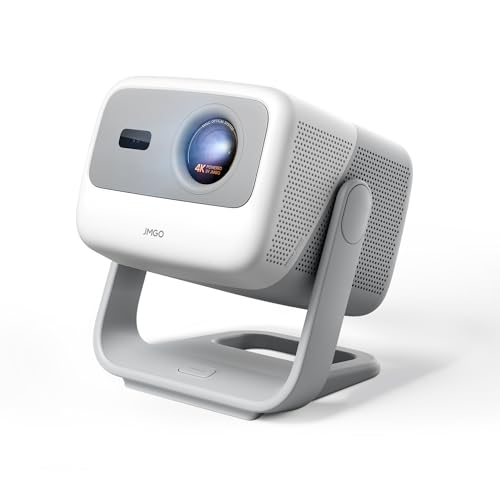
- Best 4K Gimbal: JMGO N1S 4KBest for aiming a 4K picture at any wall.
- Best for Living Rooms: Epson Home Cinema 2350Best for 3LCD brightness with Android TV.
- Best Bright 1080p: BenQ TH575iBest for high lumens with Google TV on a lamp budget.
- Best Roku: TCL C2RBest for a familiar Roku interface and AirPlay.
- Best USB-C Powered: Aurzen D1R airBest for running from a USB-C power source.
Comparison table
| Projector | Best for | Platform | Resolution | Brightness (maker's rating) | Light source | Amazon |
|---|---|---|---|---|---|---|
| XGIMI Horizon 20 | Overall | Google TV | 4K (pixel shift) | 3,200 ISO lumens | RGB triple laser | Check price |
| JMGO N1S 4K | 4K gimbal | Google TV | 4K UHD | 1,700 ISO lumens | RGB triple laser | Check price |
| Epson Home Cinema 2350 | Living rooms | Android TV | 4K PRO-UHD (pixel shift) | 2,800 lumens color/white | Lamp, 3LCD | Check price |
| BenQ TH575i | Bright 1080p | Google TV (dongle) | 1080p | 3,800 ANSI lumens | Lamp, DLP | Check price |
| TCL C2R | Roku | Roku TV | 1080p | 350 ISO lumens | Not stated | Check price |
| Aurzen D1R air | USB-C powered | Roku TV | 1080p | 300 ANSI lumens | Not stated | Check price |


Makers use different brightness standards, so compare them as tiers.
The best smart projectors, reviewed
1. XGIMI Horizon 20: Best Overall
Who it's for: living rooms that want streaming, 4K and real placement flexibility.
The Horizon 20 is rated at 3,200 ISO lumens from an RGB triple laser, and it runs Google TV with licensed Netflix, which is the combination most buyers are looking for and many smart projectors don't deliver. ProjectorCentral lists HDR10+, Dolby Vision and Full HD 3D, and a 3840 x 2160 picture from a pixel-shift chip. Our best 3D projectors list has more models with 3D.
Hardware matters here too. A 1.25x optical zoom covers a 1.2 to 1.5:1 throw, or roughly 8.7 to 10.9 ft for a 100-inch screen, and lens shift is listed at ±120% vertical and ±45% horizontal. You can mount it off-center and still keep the picture square. Most smart projectors rely on digital keystone instead, which softens the image.
Pros
- Google TV with licensed Netflix
- Optical zoom and large lens shift
- Dolby Vision and HDR10+
- RGB triple laser
Cons
- Premium price tier
- 10.6 lb isn't made for carrying around
- Light source life isn't stated in the specs we found
2. JMGO N1S 4K: Best 4K Gimbal
Who it's for: bedrooms and apartments where you want to aim at any wall or the ceiling.
JMGO's N1S 4K pairs an RGB triple laser with an integrated gimbal that rotates 127° vertically, so you can move the picture from wall to ceiling without a stand. It's rated at 1,700 ISO lumens with a 4K UHD picture and HDR10, and it runs Google TV.
That brightness suits a dimmed room and 100 inches or so rather than an afternoon in the living room. The triple laser means no color wheel, and JMGO says that eliminates the rainbow effect. Our projector for bedroom guide goes deeper on ceiling projection and quiet fans.
Pros
- Built-in gimbal, 127° vertical
- 4K triple laser
- Google TV
Cons
- Less suited to lit rooms
- Digital image correction when aimed off-axis
- Premium for its brightness
3. Epson Home Cinema 2350: Best for Living Rooms
Who it's for: family rooms that want bright, accurate color and streaming in one box.
The Home Cinema 2350 uses Epson's 3-chip 3LCD with 4K PRO-UHD pixel shifting from a native 1080p panel, rated at 2,800 lumens of color and white brightness, with Android TV built in. Its 1.32 to 2.15:1 throw (B&H; ProjectorCentral lists 1.34 to 2.17) needs roughly 9.6 to 15.6 ft for 100 inches, which suits a ceiling mount or a back shelf.
A lamp light source is the trade-off, rated at 4,500 hours or 7,500 in Eco mode. In exchange you get a ±60% vertical lens shift, which is rare at this tier and makes mounting far more forgiving. Android TV isn't as polished as Google TV, so an external stick is still a reasonable upgrade.
Pros
- 3LCD with equal color and white brightness
- Android TV built in
- ±60% vertical lens shift
- Wide 1.6x zoom
Cons
- Lamp needs eventual replacement
- Pixel shift, not native 4K
- Long throw
4. BenQ TH575i: Best Bright 1080p
Who it's for: budget-minded buyers who still want streaming and a bright picture.
BenQ's TH575i bundles a licensed Google TV dongle with a 3,800 ANSI lumen 1080p DLP projector. That's the brightest smart projector here by a wide margin, and it means you can watch sports with the blinds partly open on a 100-inch screen. ProjectorCentral lists 16.7 ms input lag at 1080p and 60Hz.
Lamp life is rated at 6,000 hours, or 10,000 hours in Eco mode, and a 1.49 to 1.64:1 throw needs about 10.8 to 11.9 ft for 100 inches. That long throw is the main limit, so check your room. Since the Google TV is on a dongle, you can upgrade it later without replacing the projector.
Pros
- 3,800 ANSI lumens
- Licensed Google TV dongle
- Good input lag for casual gaming
Cons
- Lamp-based
- Long throw
- DLP color wheel can show rainbow artifacts

5. TCL C2R: Best Roku
Who it's for: Roku users who want the same simple home screen on a bedroom projector.
TCL's C2R runs Roku TV with Netflix, live TV and The Roku Channel, plus AirPlay to mirror an iPhone. It's a 1080p projector rated at 350 ISO lumens with a 285° gimbal and auto focus with real-time keystone, so it's easy to point at a wall or ceiling.
The brightness limits it to a dark room and a modest picture. It's a great fit for bedtime TV on the ceiling, and a poor fit for a daytime living room. We cover this model in detail in the bedroom projector guide.
Pros
- Roku TV interface
- 285° gimbal
- AirPlay for iPhones
Cons
- Modest 350 ISO lumens
- 1080p only
- Dark rooms only

6. Aurzen D1R air: Best USB-C Powered
Who it's for: travelers and anyone who wants to run a projector from a USB-C power source.
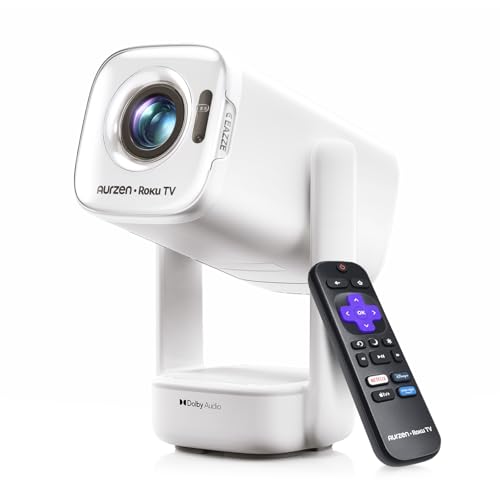
The Aurzen D1R air is a compact Roku TV projector rated at 300 ANSI lumens that can be powered over USB-C, per Aurzen's listing, so a capable power bank or laptop charger can run it. It has a gimbal stand and a 1080p picture for movies in a dark room or on the road.
It's the least bright projector here, so keep the picture modest and the room dark. Check the listing for the power output your USB-C source must supply before relying on a power bank. For more compact picks, see our projector for phone guide.
Pros
- USB-C power option
- Roku TV built in
- Gimbal stand, compact size
Cons
- 300 ANSI lumens, dark rooms only
- Needs a capable USB-C power source
- Limited sound
How to choose a smart projector
Platform and licensed apps
Google TV and Roku are the easiest platforms to live with. Android TV is capable but less polished. The catch for all of them is licensing: not every smart projector ships with a properly licensed Netflix app, and some rely on workarounds that may not get updates. If Netflix matters, look for "licensed" or "official" in the listing.
If the software on a projector you like looks old or limited, ignore it and plug in a current streaming stick. A cheap stick often outperforms built-in software anyway.
Brightness for your room
Smart projectors range widely, from about 300 lumens to almost 4,000 in this guide alone. Use the room as your guide:
| Room | Practical minimum |
|---|---|
| Dark bedroom, smaller image | 300–500 lumens |
| Dim den, 100 inches | 1,500–2,000 lumens |
| Living room with some light | 2,500 lumens and up |
| Sports with lights on | 3,500 lumens and up, plus an ALR screen |
A brighter projector also lets you run Eco mode, which is quieter.
Auto focus and keystone
Auto focus and auto keystone are what make smart projectors feel easy, especially if you move them around. They do have a cost: digital keystone reduces the picture slightly and softens it. For a permanent setup, line up the projector square to the screen, or use a stand at the right height. Our projector stand guide has options.
Portable or permanent
A gimbal projector like the JMGO or TCL is great for moving between rooms. For a permanent living-room setup, optical zoom and lens shift, as on the Horizon 20 and Epson 2350, give a cleaner picture that doesn't rely on digital correction.
Sound
Built-in speakers are better than they were, but they sit at the projector, not the screen. For a permanent setup, plan on a soundbar or receiver, and check that the projector has HDMI ARC or eARC or a Bluetooth output. Bluetooth can add a slight delay, so a wired connection is the better choice for long movie sessions.
Screen and size
A smart projector won't care what it's pointed at, but your eyes will. Use our screen size calculator to pick a size that suits your seating, and read projector screen vs wall if you're wondering whether a white wall will do.
Inputs and connectivity
Even a smart projector should have at least one HDMI input for a game console or Blu-ray player, and it's worth having two if you'll keep a soundbar on ARC. Check for Wi-Fi 5 or better if you stream in 4K, since a weak connection will buffer no matter how good the projector is.
Software updates
Streaming apps change often. Google TV and Roku are widely supported, while smaller or older platforms can fall behind. Before you buy, look at how recently the maker has updated that model, and keep a streaming stick in mind as a cheap way to extend the life of a projector whose software has aged.
Common smart projector mistakes
- Assuming Netflix is included. Look for licensed Netflix on the listing, not just "Android."
- Buying a bedroom projector for the living room. A 300-lumen projector can't compete with daylight.
- Trusting unlabeled lumen claims. Look for ANSI or ISO ratings.
- Relying on auto keystone for a permanent setup. It's convenient, but it softens the image compared with a square placement.
- Forgetting the sound. A soundbar or Bluetooth speaker often matters more than an extra feature.
How we chose
We didn't test these projectors ourselves. We compared listings from XGIMI, JMGO, Epson, BenQ, TCL and Aurzen with ProjectorCentral's spec database and retailer spec sheets, focusing on platform, licensed apps, brightness, zoom and placement. Where a rating is only the maker's claim, we say so.
FAQ
What is a smart projector?
A smart projector has an operating system such as Google TV, Roku TV or Android TV built in, so it streams apps like Netflix and YouTube over Wi-Fi without a separate box. Many also offer auto focus, auto keystone and voice control.
Do smart projectors work without Wi-Fi?
They need a network connection to stream apps, but you can still use the HDMI inputs for a Blu-ray player or console, and some can play local files from USB storage. Check the listing if offline playback matters to you.
Is Netflix included on smart projectors?
Not always. Netflix requires a licensed version. Some models, including the XGIMI Horizon 20, advertise licensed Netflix, while cheaper smart projectors may not. Always check for licensed Netflix on the listing.
Is a smart projector better than a projector with a Roku stick?
A built-in platform is tidier, with one remote and no extra power. A separate stick is cheap, faster to upgrade and can be replaced as apps change. If a projector's software looks dated or limited, add a stick and use HDMI instead.
How many lumens does a smart projector need?
For a dark bedroom, 300 to 500 lumens is enough for a modest picture. For a living room, look for 2,000 lumens or more. Makers use ISO, ANSI and other ratings, so treat brightness numbers as tiers rather than exact comparisons.
Verdict
The XGIMI Horizon 20 is the best smart projector for most rooms, with a bright 4K triple laser, Google TV and real lens shift. Pick the JMGO N1S 4K if you want a gimbal, the Epson Home Cinema 2350 for 3LCD color in a living room and the BenQ TH575i for a bright 1080p budget option. For bedtime viewing on a Roku interface, the TCL C2R is the simple choice.