We research products independently. When you buy through links on this page, we may earn a commission from Amazon at no extra cost to you. As an Amazon Associate we earn from qualifying purchases. Read our affiliate disclosure.
A projector wall mount makes sense when the ceiling is out of bounds: a rental with plaster overhead, a room with no accessible joists, or a throw distance that happens to land near a wall. It keeps the projector out of reach without any cables running across the ceiling.
What matters most is reach, because the arm has to put the lens at the right throw distance; weight rating, with a margin; and what the wall is made of, since a wall arm puts more leverage on its fasteners than most people expect. Below are five options, from extending arms to a simple wall shelf.
Our top picks at a glance
Quick picks
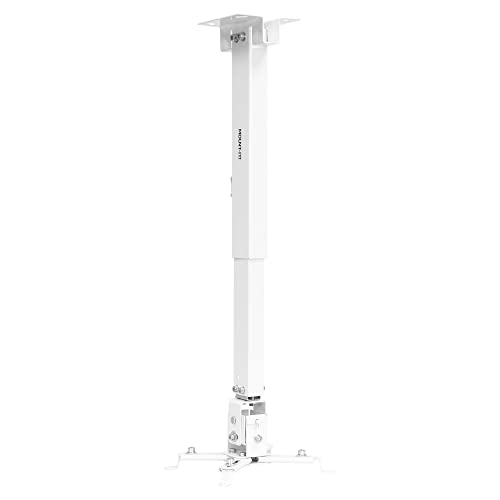
- Best Overall: VIVO MOUNT-VP06BBest for standard projectors up to 44 lb that need an extending arm.
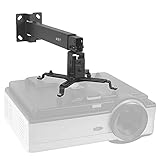
- Best Reach: Mount-It! Wall or Ceiling MountBest when you need the projector further from the wall.
- Best 3-in-1 Bracket: WALI Universal 3-in-1Best for wall and ceiling flexibility in one kit.
- Best for Mini Projectors: WALI Mini Foldable Gimbal MountBest for compact projectors with a 1/4-inch thread.
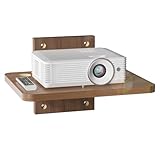
- Best Shelf: WALI 1 Tier Floating ShelfBest for projectors without usable mounting holes.
Comparison table
| Mount | Best for | Type | Weight rating | Adjustment | Amazon |
|---|---|---|---|---|---|
| VIVO MOUNT-VP06B | Overall | Extending arm, wall or ceiling | 44 lb | ±15° tilt, 16° swivel | Check price |
| Mount-It! Wall or Ceiling Mount | Reach | Extending arm, wall or ceiling | 40 lb per Mount-It's spec sheet (listing says 44 lb) | Full-motion style arm | Check price |
| WALI 3-in-1 | Bracket flexibility | Height-adjustable with extension pole | 44 lb per listing | Height, tilt, swivel | Check price |
| WALI Mini Foldable | Mini projectors | Foldable gimbal arm | See listing | 360° gimbal | See options |
| WALI 1 Tier Floating Shelf | No mounting holes | Wall shelf | 22 lb per listing | None (shelf) | Check price |


Weight ratings come from the maker's pages or listings. Always confirm the rating against the current manual.
The best projector wall mounts, reviewed
1. VIVO MOUNT-VP06B: Best Overall
Who it's for: most standard home projectors going on a wall or ceiling.
VIVO's MOUNT-VP06B is rated for 44 lb, which VIVO says is weight tested, and it covers bolt-hole patterns from 8.9 to 12.4 inches. Its extending arm runs 16.9 to 25.6 inches, with -15° to +15° tilt and 16° of swivel. That combination covers most projectors you'd want on a wall, and it mounts to a ceiling too if you change your mind later.
The hole pattern is the thing to check. If your projector's mounting holes fall outside the 8.9 to 12.4-inch range, this one won't fit, and VIVO's smaller arm-style mounts or a shelf would be better. Our ceiling mount guide covers those.
Pros
- 44 lb rating, weight tested by VIVO
- Extends 16.9 to 25.6 inches
- Works on wall or ceiling
Cons
- Hole pattern doesn't suit small projectors
- A long arm magnifies vibration from bumps
- Needs a solid wall fixing

VIVO Extending Wall or Ceiling Projector Mount MOUNT-VP06B
by VIVO
2. Mount-It! Wall or Ceiling Mount: Best Reach
Who it's for: rooms where the projector has to sit further out from the wall.
Mount-It's wall and ceiling arm covers both installs. The company's MI-604 spec sheet lists a 40 lb load capacity, with an extension from the wall of 13.5 to 22.5 inches and from the ceiling of 4.5 to 25.5 inches. Some listings for this mount say 44 lb, so play it safe and use 40 lb as your limit.
Its reach makes it a good match for projectors that need to be a set distance from the screen wall, and it can double as a ceiling mount. Check the product name on the listing you buy to make sure you're getting the wall and ceiling version rather than Mount-It's ceiling-only models, which are rated lower.
Pros
- Long reach from the wall
- Can be installed on wall or ceiling
- Universal bracket
Cons
- Spec sheet and listing disagree on capacity
- Long arms are more prone to vibration
- Check fit against your projector's holes
3. WALI Universal 3-in-1: Best 3-in-1 Bracket
Who it's for: anyone who wants the option of wall or ceiling mounting from one kit.
WALI's 3-in-1 is listed for projectors up to 44 lb and has a height-adjustable extension pole that lets you choose where the lens lands. It's marketed as a universal LCD and DLP bracket, so most standard projectors should fit, but it's worth comparing the listed hole range with your projector's mounting pattern before you order.
Think of it as a budget alternative to the VIVO. Its main advantage is flexibility, particularly if you're not sure yet whether the wall or ceiling suits your room. Check your manual and the mount's instructions before relying on the full 44 lb rating.
Pros
- Listed for up to 44 lb
- Height-adjustable pole
- Wall or ceiling use
Cons
- Fewer verified specs than the VIVO
- Pole adds vibration risk at full extension
- Check hole spacing against your projector

WALI Universal 3-in-1 Projector Ceiling and Wall Mount
by WALI
4. WALI Mini Foldable Gimbal Mount: Best for Mini Projectors
Who it's for: owners of small gimbal or cube projectors that use a tripod thread.
Most mini projectors don't have the four-hole pattern of a standard projector mount; they use a single 1/4-inch tripod thread. WALI's foldable mount is built for those, with fittings for 1/4-inch, M4 and M6 screws and a 360° gimbal so you can aim it at the wall or ceiling.
Check the weight limit on the listing, because mini mounts have much lower ratings than arm mounts. WALI's mini mount listings are in the low single digits of pounds, so this is strictly for small projectors. Our bedroom projector guide lists the kind of compact models this suits.
Pros
- Fits common mini projector threads
- 360° gimbal to aim at wall or ceiling
- Folds flat when not in use
Cons
- Low weight limit
- Not for standard home projectors
- Heavier cables can tug on it

WALI Mini Foldable Projector Wall Mount with Gimbal
by WALI
Currently unavailable on Amazon
5. WALI 1 Tier Floating Shelf: Best Shelf
Who it's for: projectors with no usable mounting holes, or setups where you want to move the projector often.
A wall shelf is the simplest "mount" of all. WALI's floating shelf is listed for up to 22 lb and suits smaller projectors, streaming boxes and audio gear. Sit the projector on top, and you can change or remove it without any tools.
The drawback is that you lose any built-in aim: a shelf-mounted projector needs lens shift or a tilt foot to center the picture, and a shelf that's placed too low means leaning on digital keystone correction. Make sure the shelf is level and doesn't block the projector's vents. A rolling projector stand is the alternative if you want the same flexibility without drilling.
Pros
- Simple to set up and adjust
- Works with any projector shape
- Doubles as a place for a streaming box
Cons
- No built-in aiming
- 22 lb limit
- Vents can be blocked if placed badly

How to choose a projector wall mount
Start with throw distance
A wall mount only works if the wall is at the right distance from the screen, or close to it. The throw ratio times the screen width tells you how far the lens has to be, so run your numbers through our throw ratio calculator before buying.
If the wall is further away than that distance, you may need a long-throw lens or a stand instead. If it's closer, a projector with a lower throw ratio will solve it.
Check the wall and the fixings
A wall arm is a lever. A projector sitting 20 inches from the wall puts a lot more force on the top fasteners than its weight suggests. For any arm-style mount, fix it into wood studs or solid masonry using the hardware in the manual. Don't rely on drywall anchors unless the mount's manual specifically says they're allowed.
Metal studs, plaster and lath, and brick all need different fixings. If you're not sure what's in your wall, get a stud finder and check before drilling, or hire an installer. Our ceiling mounting guide covers finding structure and pilot holes, and the same principles apply on a wall.
Weight and margin
Check your projector's weight in the manual and leave a margin. Heavy projectors such as a 23 lb laser model shouldn't go on a mount rated right at that weight, especially on a long arm.
Match the mounting pattern
Mounts list a range of bolt-hole spacing. Measure the distance between the threaded holes on the bottom of your projector, and compare it with the mount's range. Mini projectors, which usually have one 1/4-inch thread, need a different mount.
Image alignment
Without lens shift, the projector has to sit at the right height for the screen, usually near the top or bottom edge depending on its offset. A mount with tilt lets you aim it, but too much tilt means leaning on keystone, which softens the picture. Check your projector's offset in its manual or its throw calculator.
Cables and vibration
Long arms can pick up vibration from footsteps or a nearby door, so a short arm is better if your room allows it. Plan where the HDMI and power cables will run, and leave some slack so the cable doesn't pull on the mount.
For a tidy finish, a surface cable raceway painted to match the wall is the simplest answer. If you'd rather hide the cables inside the wall, use cables rated for in-wall use, and don't run a standard power cord through a wall. A qualified electrician can add an outlet near the mount if you need one.
When a wall mount is the wrong choice
A wall mount is a poor fit if your projector has a long throw and the wall isn't far enough from the screen, or if the lens has to sit near the middle of the room. It's also a problem when the wall is thin partition, or when vibration from a door or stairs would shake the arm. In those cases, a ceiling mount or a rolling stand is usually the better answer.
Wall mounting checklist
- Calculate the throw distance and confirm the arm can reach it.
- Find studs or solid masonry and mark them.
- Check the mounting pattern against your projector.
- Check the weight rating, leaving a margin.
- Drill pilot holes and fix the plate with the supplied hardware.
- Attach the arm to the projector on a soft surface.
- Lift it into place with a helper and connect the cables.
- Set the projection mode, then adjust tilt and zoom.
- Tighten everything once the image is square.
Tighten the bolts again after a week or two, since wall arms can settle slightly under load.
How we chose
We didn't test these mounts ourselves. We compared VIVO's and Mount-It's product pages and spec sheets with listing details, checking weight ratings, reach and fit. Where a listing and a spec sheet disagree, we say so and use the lower number.
FAQ
Can you mount a projector on the wall?
Yes. A wall mount holds the projector out from the wall on an arm, or a wall shelf holds it on a flat surface. It works best when your throw distance places the projector near a side or rear wall. Check that the arm can reach the right distance and that the projector can be flipped or rotated for your setup.
Do you need a stud for a projector wall mount?
Generally yes for anything but very light mini projectors. A wall arm levers its load against the wall, which puts stress on the fasteners, so fix the mount into wood studs or solid masonry with the hardware the manual specifies. Drywall anchors should only be used if the mount's manual approves them.
Is it better to wall mount or ceiling mount a projector?
A ceiling mount is more flexible for centering the lens on the screen, and it's the usual choice for long-throw projectors. A wall mount is easier to install, avoids drilling into the ceiling and suits rooms where the throw distance happens to match a wall.
How high should a projector be mounted on the wall?
Near the screen's height if the projector has lens shift, or within its keystone and offset range if it doesn't. Check your projector's lens offset in the manual. A shelf placed too low makes the picture tilt upward, and keystone correction will soften the image.
What weight can a projector wall mount hold?
It varies. VIVO rates the MOUNT-VP06B at 44 lb and Mount-It's MI-604 spec sheet lists 40 lb, while the WALI floating shelf is rated at 22 lb. Compare the mount's rating with the projector's weight and leave a safety margin.
Verdict
The VIVO MOUNT-VP06B is the best projector wall mount for most standard projectors: it's weight tested at 44 lb with a useful extension range. Choose the Mount-It! arm for extra reach, the WALI 3-in-1 for flexibility, the WALI mini mount for small projectors and the WALI shelf if you'd rather not bolt the projector to anything. If you can mount overhead, read our projector ceiling mount guide too, since ceiling installs give you more freedom to center the image.